Fixed by adding this line:
ISO10646_UCS2_1=Courier New-iso10646-1;
or any other font like Albattar, almatin, ...
to
~/.mlterm/aafont or /etc/mlterm/aafont
Thanks to this post:
P.S: please be more thoughtful while writing your replies.
Thanks
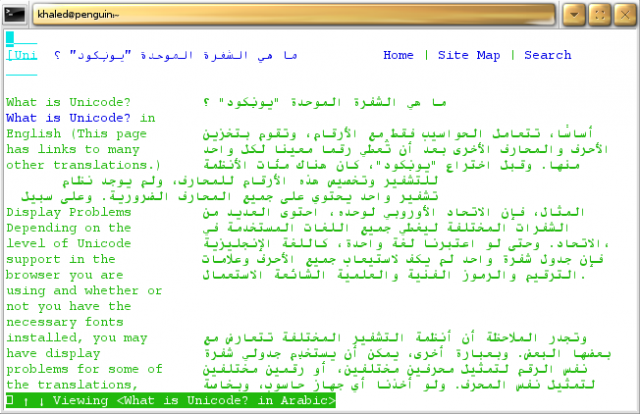
I have just installed mlterm. I am only seeing white boxes instead of Arabic text. My current locale is en_US.UTF-8. mlterm is configured to use UTF-8. What am i missing here?
Thanks



Comments
Fixed
Fixed by adding this line: ISO10646_UCS2_1=Courier New-iso10646-1; or any other font like Albattar, almatin, ... to ~/.mlterm/aafont or /etc/mlterm/aafont
Thanks to this post:
P.S: please be more thoughtful while writing your replies. Thanks
White boxes
I have just installed mlterm. I am only seeing white boxes instead of Arabic text. My current locale is en_US.UTF-8. mlterm is configured to use UTF-8. What am i missing here? Thanks
You are missing a
You are missing a font.
hammady@hammady-laptop:~$
I also added this line at the end of all /etc/mlterm/*font: ISO10646_UCS4_1_BIWIDTH=-arabeyes-aahs-medium-r-normal--0-0-0-0-p-0-iso10646-1
any idea?
I already have the fonts. I
I already have the fonts. I did apt-get install ttf-kacst ttf-arabeyes (I am on Ubuntu 9.04). The problem is already there!
I already asked you to
I already asked you to install the font I linked to. I don't care about anything else.
You should also add this line to ~/.mlterm/font
Emacs
If you use the CVS version of emacs, You can write Arabic in it!
who is speaking about emacs !
This w3m within mlterm, I can't see any emaces here.
BTW vim works for arabic, even without Arabic mode, nano works too, so who needs a buggy emacs cvs version to write in arabic :P